Quality of Service
Quality of Service (QoS) in Connect protects your APIs from cascading failures and long-running downstream calls.
It improves system stability by:
- Preventing repeated calls to failing services
- Failing fast when downstream systems are unresponsive
- Protecting upstream clients from excessive wait times
QoS ensures your platform remains responsive even when backend services degrade.
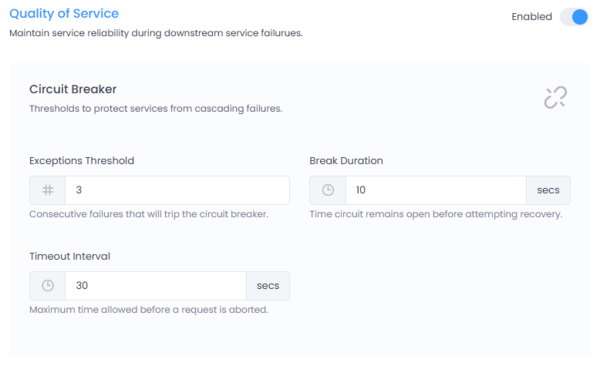
Figure 1: Quality of Service configuration interface in Connect.
Where to Configure
Navigate to:
Service → Settings → Quality of Service
Click the Enabled toggle to activate QoS enforcement for the selected service.
How It Works
Connect applies QoS policies in two ways:
- Timeout Control -- Limits how long a request can wait for a downstream response.
- Circuit Breaker -- Temporarily stops calls to a failing service after consecutive errors.
These mechanisms prevent cascading failures and reduce system strain.
Circuit Breaker
The Circuit Breaker protects downstream services from repeated calls during failure conditions.
Configuration
| Field | Description |
|---|---|
| Exceptions Threshold | Number of consecutive failures required to open the circuit |
| Break Duration | Time (in seconds) the circuit remains open before attempting recovery |
Example
Exceptions Threshold: 3
Break Duration: 10 seconds
This means:
- After 3 consecutive failures, the circuit opens.
- All further requests fail immediately without calling the downstream service.
- After 10 seconds, Connect allows a trial request.
- If the trial succeeds, the circuit closes.
- If it fails, the circuit opens again.
Behavior
When the circuit is open:
- The downstream service is not called.
- Requests fail immediately.
- This protects the system from cascading failures.
The circuit breaker is based on consecutive failures, not total failures over time.
Timeout Control
Timeout Control limits how long Connect waits for a downstream response.
Configuration Field
| Field | Description |
|---|---|
| Timeout Interval | Maximum time (secs) allowed for a downstream request before it is aborted |
Example
Timeout Interval: 30 seconds
This means:
- If the downstream service does not respond within 30 seconds,
- The request is aborted,
- A timeout error is returned to the client.
Timeouts prevent threads from being held indefinitely and improve overall responsiveness.
Error Responses
Both Timeout and Circuit Breaker failures return HTTP 503 Service Unavailable.
The response body message can be customized in Global Settings.
Enforcement Behavior
When Timeout Occurs
- The downstream call is aborted.
- An error response is returned to the client.
- The failure counts toward the circuit breaker threshold.
When Circuit Is Open
- Downstream service is not invoked.
- The request fails immediately.
- Connect attempts recovery after the configured Break Duration.
QoS enforcement happens at the Gateway Layer, before forwarding requests to downstream services.
Best Practices
- Use conservative timeout values based on realistic service latency.
- Configure a low Exceptions Threshold for critical services.
- Avoid overly long Break Durations.
- Monitor logs to detect recurring failure patterns.
- Combine QoS with Rate Limiting for complete traffic control.