Caching
The Caching section allows administrators to enable and configure response caching for a specific service in Connect.
Caching improves performance by reusing previously generated responses for identical requests. It reduces downstream load and helps manage duplicate or repeated requests efficiently.
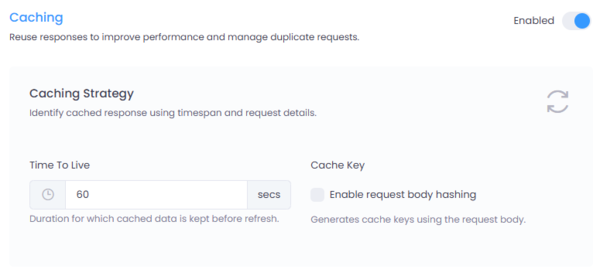
Figure 1: Caching configuration interface in Connect.
Where to Configure
Navigate to:
Service → Settings → Caching
Click the Enabled toggle to activate Caching for the selected service.
Caching Strategy
The caching strategy determines how responses are stored and retrieved.
1. Time To Live (TTL)
- Defines how long a cached response is stored before it expires.
- Measured in seconds.
- Example:
60 secondsmeans the response will be reused for 60 seconds before being refreshed.
Once the TTL expires, the next request will fetch a fresh response from the downstream service and update the cache.
2. Cache Key
The cache key determines how unique requests are identified.
By default, cache keys are generated using: - Request path - Query parameters - HTTP method
Enable Request Body Hashing
When enabled: - The request body is included in cache key generation. - A hash of the request body is used to distinguish otherwise identical requests.
This is especially useful for: - POST requests - Payload-driven APIs - Scenarios where the request body influences the response
If disabled, requests with identical URLs but different bodies may return the same cached response.
When to Use Caching
Caching is recommended for:
- Read-heavy APIs (GET requests)
- Reference data endpoints
- Frequently repeated queries
- Services with high latency
Avoid caching for:
- Real-time transactional endpoints
- Authentication flows
- Frequently changing data
- User-specific sensitive responses (unless properly isolated)
Caching Behavior
Caching applies to the entire response — including successful and error responses.
If a downstream service returns an error (for example, 500, 502, or 503) and the response is cached with a TTL of 60 seconds, the same error response will be returned for the full TTL duration.
This means:
- If the downstream service fails at time T
- And the TTL is set to
60 seconds - The error response will continue to be served from cache until T + 60 seconds
- Even if the downstream service becomes healthy during that period
Once the TTL expires, the next request will fetch a fresh response from the downstream service.
Important Consideration
Caching error responses can:
- Reduce load during downstream outages
- Prevent repeated failing calls
- Improve gateway stability during incidents
However, it may also delay recovery visibility if the downstream service becomes available before the TTL expires.
Configure TTL carefully for services where rapid recovery detection is critical.
Best Practices
- Set TTL carefully based on data volatility.
- Enable request body hashing when caching POST endpoints.
- Monitor cache hit ratios to evaluate effectiveness.
- Ensure sensitive or tenant-specific data is properly segregated.
Summary
The Caching configuration at the service level provides fine-grained control over response reuse.
By defining TTL and cache key strategy per service, Connect allows administrators to balance performance, scalability, and data freshness according to each service's requirements.