Logging
The Logging section allows administrators to configure execution logging for a specific service in Connect.
Logging helps trace issues, monitor behavior, and audit service interactions.
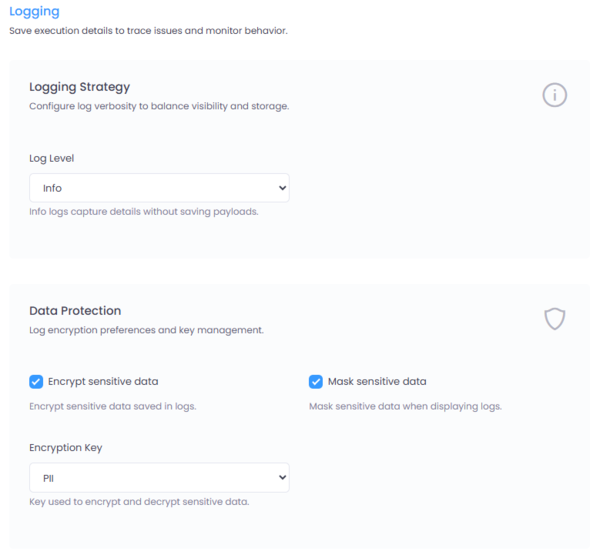
Figure 1: Logging configuration interface in Connect.
Where to Configure
Navigate to:
Service → Settings → Logging
Logging Strategy
The logging strategy determines the level of detail captured for service execution.
Log Level
Trace
- Captures full execution details
- Includes request and response payloads
- Useful for debugging and deep troubleshooting
- Generates larger log volumes
Info
- Captures execution metadata and operational details
- Does not include request/response payloads
- Recommended for production environments where payload visibility is not required
Choose the log level carefully to balance observability and storage usage.
Large Payloads
To prevent large request or response payloads from bloating the database, Connect supports storing oversized payloads externally.
If a payload exceeds a configured size threshold:
- The payload can be stored on a file system
- Or in cloud storage such as AWS S3 or Azure Blob Storage
- The database stores only a reference to the payload location
This configuration is managed in Global Settings
Data Protection
Connect provides built-in mechanisms to protect sensitive information (PII) in logs.
Encrypt Sensitive Data
When enabled:
- Configured sensitive data elements are encrypted before being stored in the database
- Encryption is applied at storage level
- An encryption key must be selected
The selected Encryption Key is used to encrypt and decrypt sensitive log data.
Mask Sensitive Data
When enabled:
- Sensitive data is masked when logs are displayed in the UI
- Masking applies only to frontend display
- Stored encrypted values remain intact in the database
Only users with the appropriate permissions can unmask and view full PII data.
Unmask permissions are configured in the Permissions section of Connect.
Best Practices
- Use Trace level only during debugging or controlled environments.
- Use Info level in production for optimal performance.
- Always enable encryption for PII-sensitive integrations.
- Enable masking to prevent accidental exposure of sensitive data.
- Configure large payload handling to maintain database performance.
Summary
Logging in Connect provides structured observability with fine-grained control over:
- Log verbosity
- PII encryption
- Frontend masking
- Large payload storage strategy
This ensures operational visibility while maintaining strong data protection controls.