Authentication
The Authentication section allows you to enforce OAuth 2.0 based access control for an individual service in Connect.
When enabled, incoming API requests must present a valid OAuth2 access token issued by Identity.
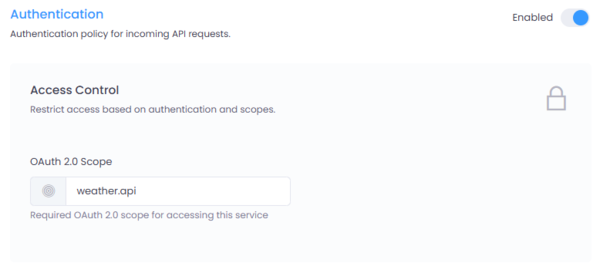
Figure 1: Authentication configuration interface in Connect.
Where to Configure
Navigate to:
Service → Settings → Authentication
Click the Enabled toggle to activate authentication for the selected service.
How It Works
Connect validates:
- The access token issued by Identity
- The OAuth2 client making the request
- The required OAuth2 scopes configured for the service
If validation fails, the request is rejected with an appropriate HTTP status (typically 401 or 403).
OAuth 2.0 Clients (Configured in Identity)
Authentication is based on OAuth2 clients created in Identity.
Best Practice
It is strongly recommended to:
- Create a separate OAuth2 client per application
- Avoid sharing client credentials across multiple applications
- Assign only the required scopes to each client
This improves: - Security isolation - Auditability - Revocation control - Scope-based access management
Each client will authenticate using OAuth2 (e.g., Client Credentials flow) to obtain an access token.
OAuth 2.0 Scopes
The scope configured in this screen is an OAuth2 scope defined in Identity.
Scopes determine what the client is allowed to access.
Gateway Scope
All clients connecting to Connect must have:
connect.gateway
This scope authorizes access to the API Gateway itself.
Service Type Scopes
Depending on the microservice type, additional scopes are required.
REST API Services
If the microservice type is REST API, the client must have:
connect.gateway
connect.restapi
<service-specific-scope>
Example:
To access a REST service with scope:
weather.api
The client must be granted:
connect.gateway
connect.restapi
weather.api
Data API Services
If the microservice type is Data API, the client must have:
connect.gateway
connect.dataapi
<service-specific-scope>
Example:
To access a Data service with scope:
customer.read
The client must be granted:
connect.gateway
connect.dataapi
customer.read
Scope Configuration in This Screen
The OAuth 2.0 Scope field defines the service-specific scope required to access this service.
When configured:
- Connect verifies the access token contains:
connect.gateway- The service-type scope (
connect.restapiorconnect.dataapi) - The configured service scope
If any required scope is missing, access is denied.
Security Best Practices
- Create one OAuth2 client per consuming application.
- Use the Client Credentials flow for machine-to-machine communication.
- Assign only necessary scopes (principle of least privilege).
- Rotate client secrets periodically.
- Avoid using wildcard or overly broad scopes.
Summary
Authentication in Connect is enforced using OAuth2 tokens issued by Identity.
Access requires:
- A valid OAuth2 client
- Gateway-level authorization (
connect.gateway) - Service-type authorization (
connect.restapiorconnect.dataapi) - The specific service scope
This layered scope model ensures secure, structured, and fine-grained access control for all services exposed through Connect.