Architecture
Connect is designed as a configurable integration platform that separates administration, runtime request processing, and service execution into distinct layers.
Administrators configure services, providers, and policies through the Connect Portal.
The Connect Gateway then uses these configurations to process API requests, apply gateway controls, and invoke downstream systems.
The following diagram illustrates the high-level architecture of Connect.
System Architecture
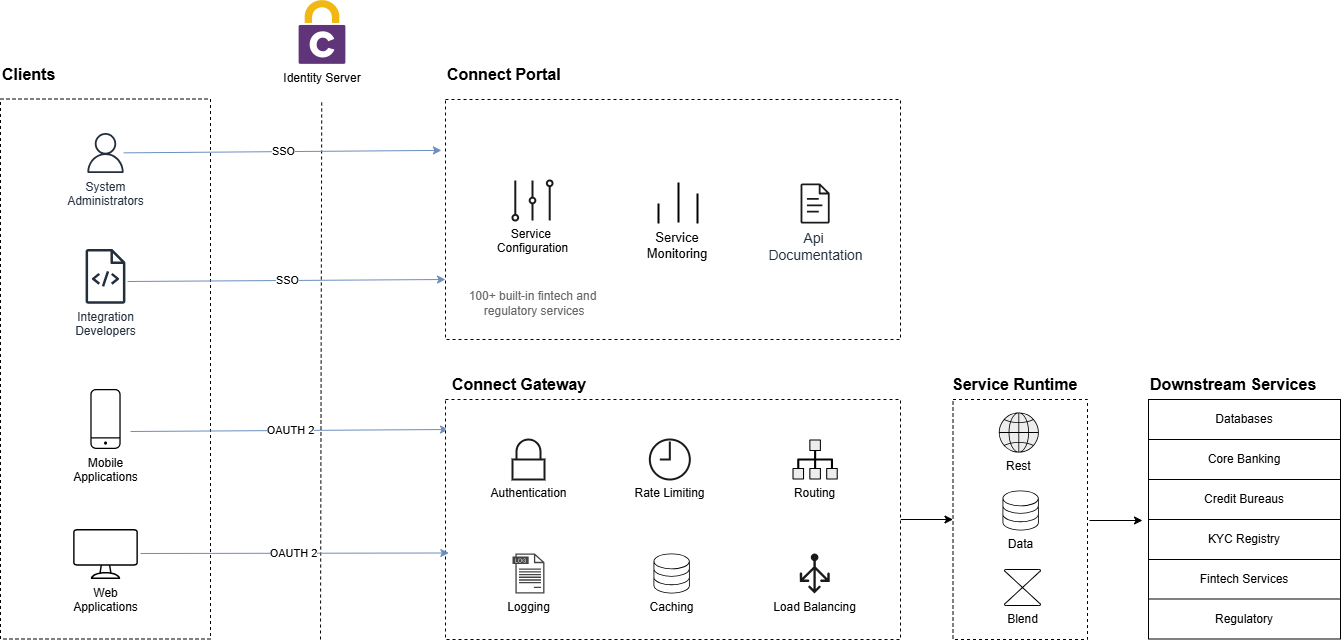
Figure 1: Connect System Architecture
This architecture separates configuration from runtime execution, allowing Connect to provide consistent governance and policy enforcement across all integrations.
Connect Portal
The Connect Portal is the administration interface used to configure and manage the platform.
Administrators use the portal to:
- Manage service providers, accounts and message profiles
- Configure and publish upstream microservices
- Create mock services for testing
- Create api documentation for microservices
- Monitor service usage and analytics
All configuration created through the portal is stored in the Connect configuration database and used by the gateway during request processing.
Connect Gateway
The Connect Gateway is responsible for processing incoming API requests.
When a request enters the gateway, it performs several gateway-level functions including:
- Request routing
- Authentication and authorization
- Rate limiting
- Caching
- Load balancing
- Request and response logging
The gateway determines the target service and executes the configured integration flow.
Service Runtime
Once a request is accepted by the gateway, it is processed by the service execution layer.
Connect supports multiple service execution models depending on the integration scenario.
REST Services
REST services expose standard REST endpoints that route requests to downstream REST APIs such as:
- Internal microservices
- Partner APIs
- Payment services
- Core banking systems
Data Services
Data services allow controlled database operations to be exposed as APIs.
These services can perform select or update operations while ensuring that database access remains governed through the gateway.
Blend Services
Blend services enable orchestration across multiple services.
They allow Connect to coordinate multiple service calls, aggregate responses, and implement conditional workflows.
Relay Services
Relay Services allow Connect to expose REST endpoints for integrations backed by non-REST systems. Connect does not perform the protocol translation itself; instead, it invokes a downstream relay service that handles the translation to SOAP, XML-based services, or other legacy protocols.
Request Flow
Every request passing through Connect follows a structured lifecycle.
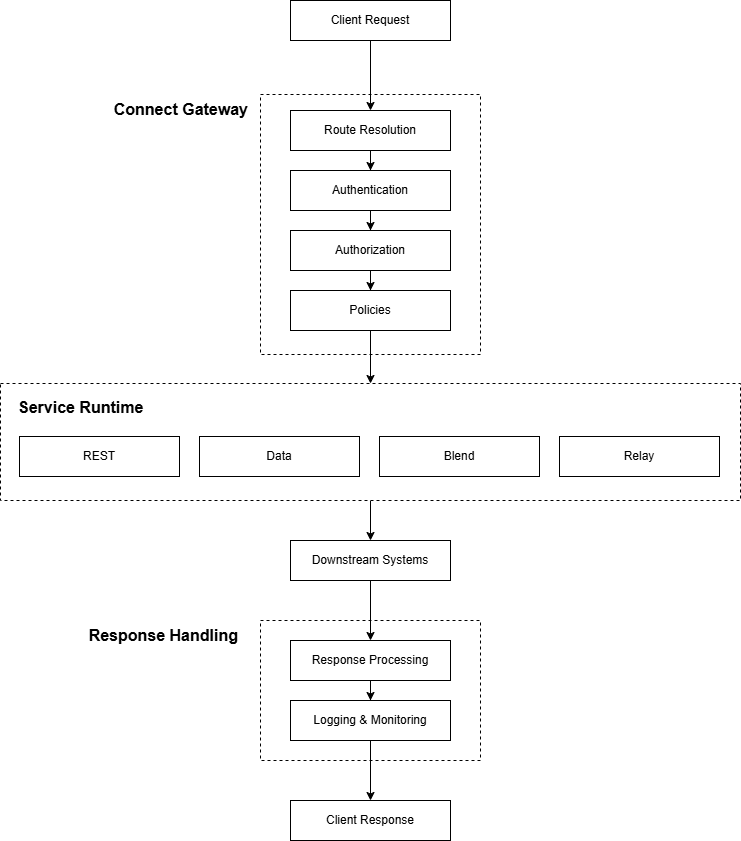
Figure 2: Connect Request Processing Flow
This lifecycle ensures that:
- Security policies are consistently applied
- Integration logic is centrally managed
- Observability is maintained across all services
How it Works
The overall workflow in Connect is as follows:
- Administrators configure services, providers, and policies through the Connect Portal.
- Configuration is stored in the Connect database.
- Clients send requests to the Connect Gateway.
- The gateway resolves the service and applies gateway policies.
- The appropriate service type is executed.
- Connect communicates with downstream systems.
- Responses are processed, logged, and returned to the client.
This architecture enables Connect to act as both:
- A secure API gateway
- A service orchestration platform
within enterprise integration environments.
Deployment Options
Connect can be deployed in different architectural roles depending on how it is used within the organization.
Inbound Gateway
In this model, Connect is positioned at the edge of the network and is exposed to external consumers such as partners, mobile applications, web applications, and third-party platforms.
Requests enter Connect from outside the organization. Connect then applies gateway controls such as authentication, routing, rate limiting, and logging before forwarding the request to internal systems.
This model is typically used when Connect acts as a secure API gateway for exposing internal services.
Outbound Integration
In this model, Connect sits within the internal network and is used to communicate with external service providers.
Internal applications call Connect, and Connect handles outbound integration concerns such as provider authentication, encryption, signing, transformation, and protocol handling before invoking public or third-party services.
This model is commonly used for integrations such as:
- Credit bureaus
- KYC and verification providers
- Payment gateways
- Government platforms
- Other third-party APIs
Hybrid Deployment
In many enterprise environments, Connect is used in both roles simultaneously.
External consumers access internal systems through Connect, while internal systems also use Connect to communicate with external providers. In this model, Connect becomes a central integration and control layer across inbound and outbound traffic.
Next Steps
Continue to Getting Started to learn how to configure Connect and create your first service.