Payload
Overview
The Payload section in Global Settings allows administrators to configure how large request and response content is handled in Connect.
To prevent excessive database growth and maintain performance, Connect can store large payloads outside the database when they exceed a defined threshold.
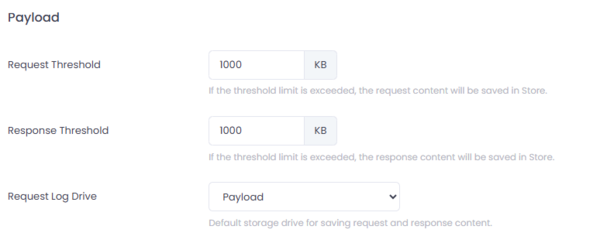
Figure 1: Global Payload Settings in Connect.
Where to Configure
Navigate to:
Setup → Settings → Payload
Request Threshold
Defines the maximum allowed size (in KB) for storing request payloads directly in the database.
If the configured threshold is exceeded:
- The request content will be stored in the configured storage location
- The database will store only a reference to the stored payload
Example:
1000 KB
Response Threshold
Defines the maximum allowed size (in KB) for storing response payloads directly in the database.
If the threshold is exceeded:
- The response content will be saved in the configured storage location
- The database will store only a reference
Example:
1000 KB
Request Log Drive
Specifies the default storage location for request and response payload content that exceeds the configured thresholds.
The storage location may be:
- File system storage
- Network drive
- Cloud storage (e.g., AWS S3, Azure Blob Storage)
Only a reference to the external file is maintained in the database.
Note: Storage drives can be configured under
Setup → Log Maintenance → Storage Drives.
Why This Is Important
Large payloads can:
- Significantly increase database size
- Impact backup performance
- Slow down query execution
- Increase storage costs
By offloading large payloads to file or cloud storage, Connect ensures:
- Optimized database performance
- Controlled storage growth
- Improved scalability
Best Practices
- Set thresholds based on expected payload size.
- Avoid very high limits in production environments.
- Use reliable and scalable storage for external payload storage.
- Monitor storage usage periodically.
Summary
The Payload configuration in Global Settings enables Connect to manage large request and response content efficiently.
By defining size thresholds and storage locations, administrators can maintain performance while ensuring full payload traceability.