Error Messages
Overview
The Error Messages section in Global Settings allows administrators to configure custom HTTP error responses returned by the Gateway.
Instead of sending default HTTP responses, you can:
- Enable custom responses for specific HTTP error codes
- Define the response content type
- Provide a custom response body
This ensures consistent and controlled error handling across all services.
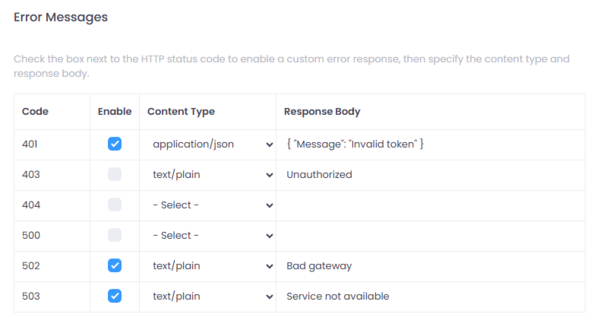
Figure 1: Global Error Messages Settings in Connect.
Where to Configure
Navigate to:
Setup → Settings → Error Messages
How It Works
For each HTTP status code:
- Enable -- Check the box to activate a custom response for that status code.
- Content Type -- Select the MIME type of the response (e.g.,
application/json,text/plain). - Response Body -- Define the exact content returned to the client.
If a status code is not enabled, the default response will be returned.
Configurable Status Codes
401 - Unauthorized
- Used when authentication fails (e.g., invalid or expired token).
- Example:
{ "Message": "Invalid token" }
403 - Forbidden
- Used when the client is authenticated but does not have sufficient permissions.
- Example:
{ "Message": "Unauthorized" }
404 - Not Found
- Used when the requested resource or route does not exist.
- Can be customized if enabled.
{ "Message": "Not found" }
500 - Internal Server Error
- Used when an unexpected error occurs within the Gateway.
- Can be customized if enabled.
{ "Message": "Unexpected error" }
502 - Bad Gateway
- Used when the downstream service is unavailable or returns an invalid response.
- Example:
{ "Message": "Service failure" }
503 - Service Unavailable
- Used when the service is temporarily unavailable (e.g., maintenance or overload).
- Example:
{ "Message": "Service busy" }
Best Practices
- Use application/json for API-based services to ensure structured error handling.
- Keep error messages consistent across environments.
- Avoid exposing sensitive internal system details in error responses.
When to Use
Custom error responses are useful when:
- You want consistent branding in API responses
- Clients require a fixed JSON structure
- You want to hide internal error details
- You need standardized integration behavior for partners
Summary
The Error Messages configuration in Global Settings provides centralized control over how the Gateway responds to HTTP errors.
By enabling and customizing responses per status code, administrators can enforce consistent, secure, and integration-friendly error handling across all services.