General Settings
Overview
The General section in Global Settings allows administrators to configure platform-wide default values and session management behavior in Connect.
These settings apply globally across the application.
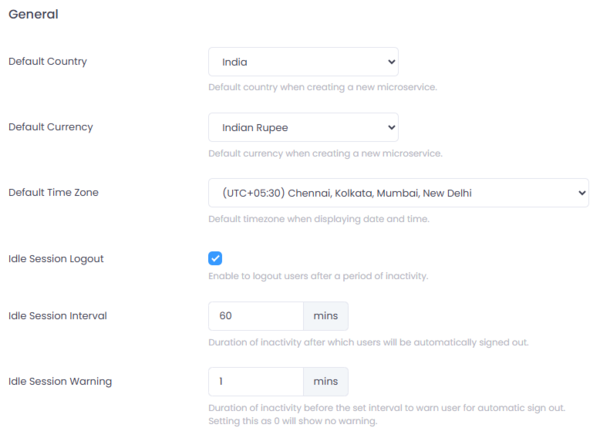
Figure 1: General Settings in Connect.
Where to Configure
Navigate to:
Setup → Settings → General
Default Values
Default values are used when creating new microservices and when displaying platform data.
Default Country
Specifies the default country selected when creating a new microservice.
Example:
India
This helps standardize configuration for deployments operating primarily in a single region.
Default Currency
Specifies the default currency used when creating a new microservice.
Example:
Indian Rupee
This ensures financial and transactional services use consistent currency defaults.
Default Time Zone
Defines the default time zone used when displaying date and time values across Connect.
Example:
(UTC+05:30) Chennai, Kolkata, Mumbai, New Delhi
This ensures:
- Consistent log timestamps
- Uniform scheduling behavior
- Standardized reporting
Idle Session Logout
Connect allows automatic logout of inactive users to improve security.
Enable Idle Session Logout
When enabled:
- Users will be automatically signed out after a defined period of inactivity.
- Helps prevent unauthorized access due to unattended sessions.
Idle Session Interval
Defines the total duration of inactivity (in minutes) after which a user is automatically logged out.
Example:
60 minutes
After this duration, the user session is terminated.
Idle Session Warning
Defines how many minutes before automatic logout the user should receive a warning notification.
Example:
1 minute
If set to:
- A value greater than
0→ A warning message is shown before logout. 0→ No warning is displayed.
This allows users to extend their session before being signed out.
Best Practices
- Enable idle logout in production environments.
- Use shorter intervals for highly sensitive environments.
- Always configure a warning period to improve user experience.
- Align timeout policies with organizational security policies.
Summary
The General Settings configuration in Connect provides centralized control over:
- Default country, currency, and time zone
- Automatic idle session logout
- User inactivity warnings
These settings help maintain consistency, usability, and security across the platform.