Rate Limiting
Global Rate Limiting Settings allow administrators to control how rate limiting behaves across the entire Connect platform.
These settings define whether rate limit headers are returned, how clients are identified and the response status code and message to return when the rate limit is exceeded. Global settings do not define limits — they define how limits are communicated.
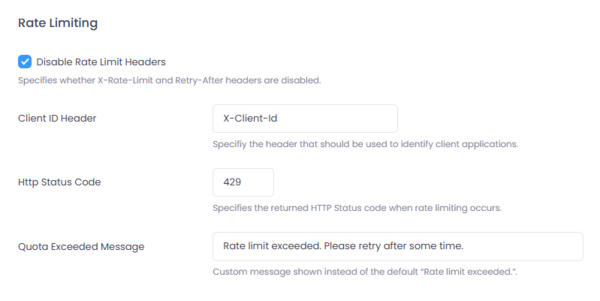
Figure 1: Global Rate Limiting Settings in Connect.
Where to Configure
Navigate to:
Setup → Settings → Rate Limiting
Configuration Fields
Disable Rate Limit Headers
Controls whether rate limiting headers such as:
- X-RateLimit-Limit
- X-RateLimit-Remaining
- X-RateLimit-Reset
- Retry-After
are returned in responses.
When enabled:
- These headers are suppressed.
- Clients will only receive the configured HTTP status code and message.
When disabled:
- Rate limit metadata is included in responses.
Client ID Header
Specifies the HTTP header used to identify the client.
Example: X-Client-Id
Connect uses this header value to:
- Track request counts
- Apply client-specific rate limits
- Enforce whitelist rules
Connect extracts the Client ID from the OAuth2 token and automatically populates the configured Client ID header.
HTTP Status Code
Defines the HTTP status code returned when a rate limit is exceeded.
Default: 429
Quota Exceeded Message
Specifies the custom message returned when the rate limit is exceeded.
If left blank, the default message is: "Rate limit exceeded"