Execution Flow
A Message Profile executes steps sequentially to process requests and responses when communicating with downstream systems.
Each step forms part of a deterministic processing pipeline, ensuring predictable and repeatable integration behavior.
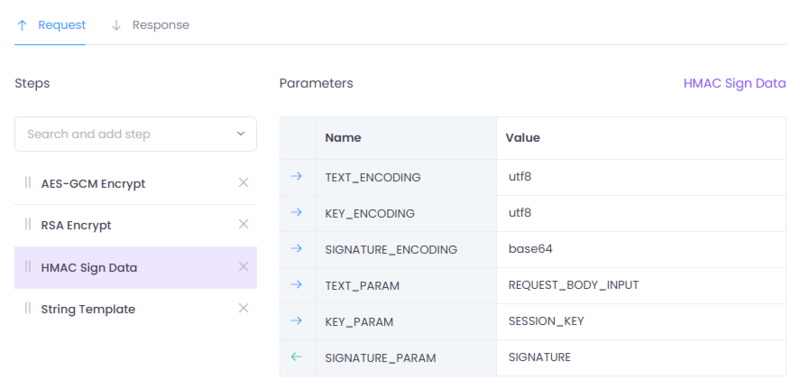
Figure 1: Message profile configuration interface in Connect.
Request and Response Pipelines
Message Profiles define two independent processing flows:
- Request Flow -- Executed before sending a request to the downstream provider.
- Response Flow -- Executed after receiving a response from the downstream provider.
These flows are configured separately and may contain different steps.
Step Execution Order
Steps are executed strictly in the order they appear in the profile.
For example:
- Transform payload
- Extract JSON value
- Encrypt payload
- Sign payload
Execution is sequential and deterministic.
The output produced by one step becomes available to subsequent steps within the same execution context.
Execution Context
Each Message Profile execution runs inside a defined runtime context.
This context contains:
- The current payload
- A shared parameter collection
- Reserved input and output body parameters
All steps operate within this shared execution context.
Reserved Body Parameters
Connect provides reserved parameters that control how payloads move through the pipeline.
These parameters define the contract between the pipeline and the Gateway.
Request Pipeline
-
REQUEST_BODY_INPUT
Contains the original request payload passed into the profile. -
REQUEST_BODY_OUTPUT
Must contain the final transformed request payload that will be sent to the downstream provider.
Execution begins with REQUEST_BODY_INPUT.
Each step may:
- Read from
REQUEST_BODY_INPUT - Read from or write to shared parameters
- Update
REQUEST_BODY_OUTPUT
At the end of execution, the value of REQUEST_BODY_OUTPUT becomes the
outbound request body.
Response Pipeline
-
RESPONSE_BODY_INPUT
Contains the raw response received from the downstream provider. -
RESPONSE_BODY_OUTPUT
Must contain the final transformed response returned to the caller.
Execution begins with RESPONSE_BODY_INPUT.
Each step may:
- Decrypt the response
- Validate signatures
- Extract values using JSONPath
- Transform the payload structure
- Set
RESPONSE_BODY_OUTPUT
The final value of RESPONSE_BODY_OUTPUT is returned to the client.
Parameter Propagation
In addition to reserved body parameters, steps can define and store custom parameters.
These parameters:
- Persist across steps within the same execution
- Can be populated using JSONPath extraction
- Can be reused by encryption, signing, or transformation steps
This enables dynamic, context-aware processing across the pipeline.
Parameter Resolution
Message Profiles support dynamic parameter resolution using Service Accounts.
Service Accounts allow configuration of environment-specific message parameters such as:
PRIVATE_KEYPUBLIC_KEYHMAC_SECRET- Certificates or other provider-specific values
When configuring a step parameter, you can:
- Provide a static value directly.
- Reference a dynamic value using Mustache syntax.
Example:
{{PRIVATE_KEY}}
Resolution Behavior
When a step parameter contains a Mustache reference:
- The engine looks for a value in the message parameters of the Service Account.
- The placeholder is replaced with the resolved value before the step executes.
This allows:
- Reusing the same Message Profile across environments
- Avoiding hardcoded cryptographic material in step configuration
- Switching keys by selecting a different Service Account
- Maintaining secure separation between configuration and logic
Error Handling
If a step fails during execution:
- The pipeline execution stops immediately.
- The error is returned.
- For request failures, downstream communication is not performed.
This ensures message integrity and prevents partial or inconsistent execution.
Execution Contract
For a profile to complete successfully:
- The request pipeline must produce a valid
REQUEST_BODY_OUTPUT. - The response pipeline must produce a valid
RESPONSE_BODY_OUTPUT.
If the required output is not produced, execution is considered incomplete and an error is returned.
Summary
The Execution Flow defines how Message Profile steps work together to form a structured and deterministic integration pipeline.
By separating input and output payloads, enforcing ordered execution, and providing shared parameter propagation, Connect enables secure, reusable, and maintainable message processing without application code changes.